Showing posts with label linux. Show all posts

Saturday, May 15, 2010

Ubuntu Lucid update

Following my disappointment with Kubuntu Lucid, I just got around to replacing it with the standard Ubuntu Lucid desktop. It's possible to switch desktop environments using a couple of package manager commands, but I decided to do a from-scratch reinstall.

With a little effort, I was able to make most of the Ubuntu desktop behave OK. Window management is still not up to par with KDE 3.5 + KStep window decorations, but it's enough for now. I'll probably switch my window manager to WindowMaker at some point. (NeXTSTEP-style window decorations with X11 window management gestures are the apex of desktop window management, for reasons that I could go into at length but won't today.) Visually, the new Ubuntu theme looks nice; in fact it looks and feels much better when you're using it than it does in screen shots.

However, there's one fly in the ointment. Sound didn't work. At all. Note that for all its flaws, Kubuntu, which is derived from the same base distribution, had no such problem, so it isn't simply a driver issue. I could bore you with all the details of my debugging adventure, but at the end of the day I blame PulseAudio, and Ubuntu's decision to make PulseAudio central to their desktop sound system. After a couple of hours of unproductive web searching and config file wrangling, removing the PulseAudio packages in Synaptic made sound work, sort of.

Yes, sort of. It still doesn't work quite right. When I open the System > Preferences > Sound menu, I get a dialog box saying "Waiting for sound system to respond" and nothing else. (This behavior occurred before I uninstalled PulseAudio, so that's not the cause.) Apparently a whole lot of people have run into variations of this problem since at least Ubuntu 9.10, and nobody seems to have definitive answers on how to solve it. I'd report it as a bug, but I suspect that it's one of those opaque symptoms with dozens of underlying possible causes and it's probably futile.

I want to emphasize that I haven't had a problem like this with a Linux distribution in years. This is literally a regression in behavior to Linux ca. 2005. Poking around by hand with .conf files in /etc just to get something working on my desktop is something I used to do. It's not something I expect to be doing in the year 2010.

So, anyway, I can't set my sound preferences. I guess I'll just have to cross my fingers and hope Ubuntu didn't assign any really annoying sounds to desktop events.

Saturday, May 01, 2010

Kubuntu Lucid and KDE 4 reactions

Speaking of how software makes you dependent on other people, the newest Ubuntu Long Term Support (LTS) release just came out. This means that in a year, support for the previous LTS release will wind down; which in turn means that Ubuntu users must upgrade sooner or later, unless they want to sacrifice security updates and compatibility with new releases of third-party software.

So, I took the plunge: yesterday I downloaded and installed Kubuntu Lucid.

This is the first Ubuntu LTS release that runs KDE 4, the latest major revision of KDE. I've been using KDE for about 11 years, ever since version 1.1. My immediate reaction was simply that KDE 4 is a mess. And after playing around for a few hours, tweaking settings, and trying to settle in, I still think KDE 4 is a mess. As I use it more, I'm not settling into it; I'm simply accumulating more irritations.

Without exhaustively listing all the details, my complaints basically break down into three categories.

First, there are pervasive performance problems. In every corner of the UI, "shiny" effects have been prioritized over responsive, performant interactivity. To take just one example, under KDE 3.5, the Amarok media player used to be super snappy and responsive; it left iTunes or Windows Media player in the dust. In KDE 4, Amarok takes a couple of seconds to expand one album or to queue up songs, and resizing UI panels is painfully slow and janky. (My workstation has a 2.13GHz Core 2 Duo and a good graphics card. This should not be happening.) Similar problems can be observed in the desktop panels, file manager, etc.

Second, in general, the UI changes seem designed to push KDE's new technology into your attention space, rather than getting out of the way so you can accomplish tasks. Again, here's just one example: in the upper right corner of the desktop, there's a little unremovable widget that opens the "activities" menu:

The upper right corner of the desktop is a hugely valuable piece of screen real estate. By placing this widget in the upper right corner, the developers are signaling that this menu contains operations which will be frequently accessed. Do they really think users will add new panels to the desktop frequently? (For non-KDE users, a "panel" is KDE's equivalent of the Mac OS X dock or the Windows taskbar.) So far, almost every time I've clicked this widget has been by accident while trying to close or resize a window.

If you're a desktop developer who wants to show off your technology, this design may sound good: you put this menu there to make sure users discover your desktop widget and "activities" technology*. However, if you're a user, then this menu mostly gets in your way, and you wish it were tucked away somewhere more discreet.

Third, the KDE 4 version of every application has fewer features and more bugs than the KDE 3 version. The "Desktop" activity no longer has a way to "clean up" icons without repositioning all of them in the upper-left-hand corner. The Konsole terminal application's tab bar no longer has a button from which you can launch different session types. The list goes on.

Anyway, of course, I don't pay for KDE, and so in some sense this is all bitching about free beer. However, suppose I did pay for KDE. Would I have any more input into the process? Windows users pay for Windows; if you don't like the direction Vista and Windows 7 are taking the UI, do you think you personally have any chance of influencing Microsoft's behavior? Mac users pay for Mac OS X; if you disagree with Steve Jobs, do you have any chance of influencing Apple's behavior? In fact, you do not, and both user populations have experienced this reality multiple times in the past decade. Mac users loved the Mac OS 9 UI but they had to give it up when Apple stopped supporting it on new Macs. Microsoft users who are attached to the Windows XP UI will likewise be forced to give it up eventually, when Microsoft stops sending security patches.

The KDE 3 to KDE 4 transition is simply KDE's version of the OS 9 to OS X transition, or the XP to Vista/7 transition. Except that those seem to have worked out OK in the end, whereas KDE 4, which was released over two years ago, seems to have lost its way permanently.

I'm writing this post not just to point out KDE 4's defects — I mean, it feels good to vent, but who really cares — but also to marshal further evidence in support of my contention that owning software doesn't mean much anymore.

Even the fact that KDE is Free Software means little in this case. I mean, what am I supposed to do now? I can't stay with the previous Ubuntu LTS release forever, unless I want to expose myself to security risks, and also be unable to run or to compile new software, both of which are deadly for a software developer. Conversely, I can't singlehandedly maintain a fork of the KDE 3 environment forever; this guy's trying but without a large and active community behind the project, it's doubtful that it will remain current for long. And frankly, I'm getting older, and I don't have enough time to invest in both hacking around with my desktop environment and also accomplishing the other things I want to accomplish in my life.

So, I can either (1) suck it up and live with KDE 4, or (2) abandon the desktop environment I've grown to love over the past 11 years, and jump ship to GNOME or something. (Right now I'm leaning towards (2).) Adopting software means making a calculated bet on the behavior of other people. And sometimes you lose.


*BTW "activities" are 80% redundant with virtual desktops and therefore hugely problematic and confusing as UI design, but I won't get into that.

Sunday, April 20, 2008

+1 for dnsmasq

If you use Ubuntu, and you spend too much time staring at "Looking up www.something.com..." in your browser's status bar, this hack is really worth the 5 minutes.

Actually, the above writeup is out of date (although it contains some additional details if you care to understand what's going on). On Ubuntu 7.10, it's even simpler:

  1. sudo apt-get install dnsmasq
  2. Uncomment the following line in /etc/dhcp3/dhclient.conf:
    prepend domain-name-servers 127.0.0.1;
  3. Restart your network connection. (I do this using the KDE system tray icon; ifconfig works too.)
  4. If cat /etc/resolv.conf turns up a line containing nameserver 127.0.0.1, you're done.

Background: I have Comcast, and its DNS servers are completely terrible. They can take minutes --- minutes! --- to respond to a lookup query for a pretty popular hostname like www.blogger.com. Equally often, hostname lookups fail entirely. I don't know what Comcast's doing wrong --- running DNS servers is, in Internet terms, an ancient problem --- but anyway, it's really frustrating. I am strongly considering switching to DSL, but that will probably take weeks for me to finish researching and setting up, because I don't have a land line (ugh).

In the meantime, dnsmasq caches DNS lookups on my local machine, making subsequent lookups to a given hostname after the first one almost instantaneous and perfectly reliable. This doesn't really fix the underlying problem in Comcast's DNS servers, but it does mitigate the pain I experience because of it.

Monday, July 03, 2006

Video corruption on resume from suspend on Thinkpad T42 with Fedora Core 5 and Xorg

Note: Narrowly targeted Google-food. Skip if you do not run a recent version of Linux on a Thinkpad T42 with the Xorg X server.

I run Fedora Core 5 on a Thinkpad T42. Like a good conscientious user, I run yum update regularly to download and install the latest security fixes and patches. Sometime in the past month or so, one of these updates broke suspend. Whenever I resume from suspend --- i.e., whenever I close the laptop's lid and open it again --- my desktop's background wallpaper gets corrupted. My lovely shot of Lake Union gets overwritten with noise: either jaggy, staggered horizontal black and white lines, or a sprinkling of randomly colored "off" pixels.

Oddly, this symptom does not manifest itself when I set my desktop background to plain black. However, using a computer without wallpaper is clearly beyond the pale of what a civilized human being can rationally tolerate.

I have no clue what's at fault: the kernel, the X server, or some other part of my laptop's software ecosystem? Who knows? My wild-assed guess is that somewhere during suspend, the video driver or kernel decides that the video memory buffer allocated for the wallpaper bitmap can be safely used for scratch space to doodle upon, or whatever it is that OS software does. I don't want to manually roll back the scads of packages I've updated via yum (Xorg alone installs about two dozen RPMs), and I don't know how to go about debugging this problem for real. I don't even know whose Bugzilla to report this to --- Fedora? Linux kernel? Xorg? Probably all of them will either ask me to debug the problem, or tell me to file the problem on someone else's Bugzilla.

Sigh. Such is the life of the user of a computer system where nobody takes responsibility for the entire hardware/software stack. I like Linux considerably, but at times like this I wonder if I should just ditch it all for a Mac, thereby giving up freedom for convenience.

In any case, my mad Google-fu did not turn up a solution, strictly speaking. However, it did turn up a pointer that eventually led me to vbetool, a system for tickling your video BIOS. My current suspend-and-resume script (/etc/acpi/actions/sleep.sh) now uses the following magic (recent additions in orange):

#!/bin/sh

# Sleep the network
# (Following should all be one line.
# Blogger keeps borking backslash-escaped EOLs)
/usr/bin/dbus-send --system
      --dest=org.freedesktop.NetworkManager
      --type=method_call
      /org/freedesktop/NetworkManager
      org.freedesktop.NetworkManager.sleep

# Save vbestate
/usr/bin/chvt 1
/usr/sbin/vbetool vbestate save >/var/tmp/vbestate

/usr/sbin/hwclock --systohc
echo -n mem >/sys/power/state
/usr/sbin/hwclock --hctosys

# Fix video corruption on resume by resetting vbestate.
/usr/bin/chvt 1
if [ -f /var/tmp/vbestate ]; then
    cat /var/tmp/vbestate | /usr/sbin/vbetool vbestate restore
    rm -f /var/tmp/vbestate
fi
/usr/bin/chvt 7

# Wake the network
# (Following should all be one line.
# Blogger keeps borking backslash-escaped EOLs)
/usr/bin/dbus-send --system
      --dest=org.freedesktop.NetworkManager
      --type=method_call
      /org/freedesktop/NetworkManager
      org.freedesktop.NetworkManager.wake

Note the chvt and vbetool vbestate calls, which save the state to /var/tmp/vbestate before suspend and restore it after suspend. You're not supposed to save and restore the Video BIOS state while you're in an X session, so I use chvt to switch to a text console before invoking vbetool, and back to the X console afterwards. This appears to fix the video corruption problem. Truthfully, I don't know why. Oh well. In the absence of understanding, I'll settle for voodoo.

For reference, I am currently running:

  • kernel-2.6.16-1.2133_FC5
  • xorg-x11-server-Xorg-1.0.1-9.fc5.5

UPDATE 26 August 2006: Fixed sleep/wake of network.

Sunday, April 16, 2006

Fedora make Cog mad! Cog smash! Cog... buy stuff... (sigh).

Warning: Navel-gazing techie whining follows. Skip if you value your time.

So, I thought I'd spend a lazy Easter afternoon upgrading my Fedora installation to Core 5. I've been running Fedora on various machines since the first stable release, and on my current weapon of choice since Core 3, and seldom have I encountered even a faint sigh of protest when upgrading. Usually, getting the upgrade to work involved freeing up a few hundred MB of disk space, but nothing too outrageous.

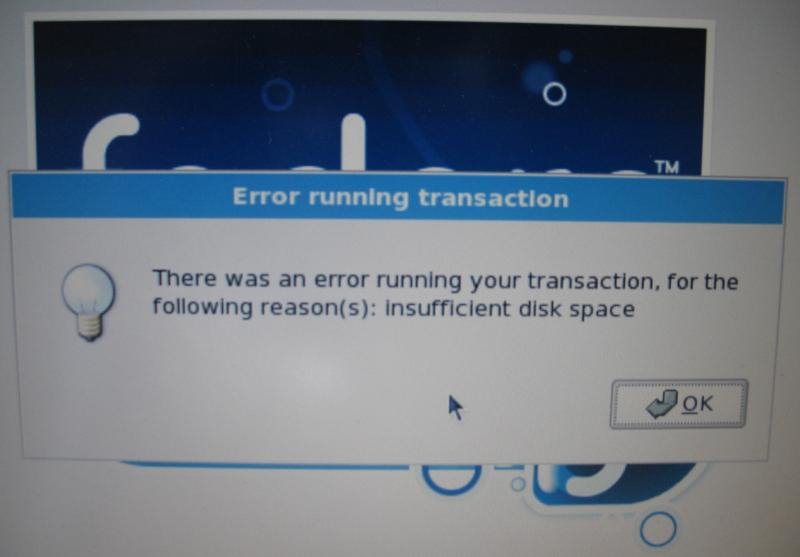
Well, Fedora's upgrade footprint has finally bloated to the point where it required excruciating and unreasonable effort on my part. If my disk were more capacious, it would have been no problem; but I've only got 4.3GB on my root partition, of which I seldom have more than 1GB free. Time and again, Fedora sadistically mocked my aspirations, promising an impending upgrade...

...only to snatch the football away at the last moment:

Notice that Fedora doesn't tell you how much disk space would make it happy. So, I went and deleted a few packages and re-ran the installer, and... anybody who's read Peanuts can complete the strip here.

At long last, after exerting heroic efforts, including erasing all my office software, half my programming tools, and most of my multimedia apps, I finally got 1.75GB of disk space free, whereupon the upgrade process went through without a hitch. Grrr.

Let me make clear that there's no good reason for the upgrade to need that much space. After the upgrade went through, I had about 1.9GB free. Fedora's installer simply insisted on copying a ridiculous mass of data (RPMs, I assume) from the DVD-ROM to the hard drive prior to installing them, so that I effectively needed enough disk space for two copies of the operating system. Which doesn't make any sense. Before upgrade: one operating system; after upgrade: one operating system. At no point was it really necessary to have two operating systems on the hard disk.

As it happens, I've been feeling the pinch in other ways w.r.t. hard drive space anyway, especially since I bought my first real digital camera last year, so I decided that it was finally time to buy a new hard drive. (There goes my tax refund.) Whereupon I realized that (1) I dual boot Linux and Windows, (2) I don't trust disk tranfer utilities to deal with my dual boot situation, and (3) IBM does not ship a Windows reinstallation disk by default with its Thinkpads, so I had to order one. As my warranty expired in February, this involves paying $45 for another copy of an operating system I already own. Grrr.

Anyway, I hereby offer the following advice, so that this post won't only be a useless whining session:

  • When buying a notebook computer, if you are a demanding user, buy the biggest hard drive available. Every single time I've owned a notebook, I've filled up the hard drive before I've outgrown any other part of the computer (video card, CPU, RAM, whatever). This has been true even when I've been initially amazed at the spectacular --- nay, intimidating --- size of my hard drive.
  • When buying a notebook computer, make sure that you obtain an installation CD for your OS right after you buy it, so that it's still in warranty. I'm not sure if IBM/Lenovo is the only vendor who regularly ships notebooks without an OS install disk, but be aware of the issue.
  • If you ever want to repartition a disk, use a GParted bootable LiveCD. It's amazing to me how utterly superior GParted is to, say, Partition Magic. I mean, it's not that amazing, because I've always wondered what makes repartitioning so hard anyway. (It seems exactly like a mixture of copying and compacting garbage collection, which have been solved problems for decades.) Anyway, Partition Magic and its commercial cousins are basically obsolete now.